23 dic 2007

Visual Studio 2008 Training Kit

Descarga este contenido tecnico para 5 dias incluyendo 20 hands-on-labs, 28 presentaciones y 20 demos con scipts.

El VS2008 Training Kit cubre las siguientes tecnologías:

  • LINQ
  • C# 3.0
  • VB 9
  • WCF
  • WF
  • WPF
  • Windows Cardspace
  • Silverlight
  • ASP.NET AJAX
  • .NET Compact Framework 3.5
  • VSTO 3.0
  • Visual Studio Team System y
  • Team Foundation Server

Descargalo: http://go.microsoft.com/?linkid=7602397 (~120 Mb)

25 nov 2007

Binary Serializers Methods

 Core Serialization Methods

 #region Binary Serializers public static System.IO.MemoryStream SerializeBinary(object request) {   System.Runtime.Serialization.Formatters.Binary.BinaryFormatter serializer =    new System.Runtime.Serialization.Formatters.Binary.BinaryFormatter();   System.IO.MemoryStream memStream = new System.IO.MemoryStream();   serializer.Serialize(memStream, request);   return memStream; }  public static object DeSerializeBinary(System.IO.MemoryStream memStream) {   memStream.Position=0;   System.Runtime.Serialization.Formatters.Binary.BinaryFormatter deserializer =    new System.Runtime.Serialization.Formatters.Binary.BinaryFormatter();   object newobj = deserializer.Deserialize(memStream);   memStream.Close();   return newobj; } 

4 nov 2007

CodeTranslator: Free Code Translation From VB.NET <-> C#

Free Code Translation for .NET (C#<->VB.NET


For now it only supports from VB.NET to C# and from C# to VB.NET.


3 nov 2007

Eval en .NET - Microsoft.JScript.Eval.JScriptEvaluate

   Dim overhead As String = "10"
        Dim a As Integer
        Dim b As Integer
        Dim c As Integer
        c = 20
        a = 10
        b = 15
        Dim sExpression As String = "a+b"
        sExpression = Replace(sExpression, "a", a)
        sExpression = Replace(sExpression, "b", b)
        MsgBox(sExpression)
        Dim oResult As Object

        Try
            Dim myEngine As Microsoft.JScript.Vsa.VsaEngine = Microsoft.JScript.Vsa.VsaEngine.CreateEngine()
            oResult = Microsoft.JScript.Eval.JScriptEvaluate (sExpression, myEngine)

            MsgBox(oResult)
        Catch ex As Exception
            MsgBox(ex.Message & ex.Source)
        End Try

Patterns con Ejemplos y Usos - Net & Java

Descriptions of the patterns


Patterns of Enterprise Application Architecture


.

Patterns of Enterprise Application Architecture (P of EAA).

 Patterns of Enterprise Application Architecture (P of EAA).

These pages are a brief overview of each of the patterns in P of EAA. They aren't intended to stand alone, but merely as a quick aide-memoire for those familiar with them, and a handy link if you want to refer to one online. In the future I may add some post-publication comments into the material here, but we'll see how that works out.

Many of these diagrams demonstrate the rather poor GIF output of Visio. The nice diagrams were redrawn for me by David Heinemeier Hansson

Domain Logic Patterns: Transaction Script (110), Domain Model (116), Table Module (125), Service Layer (133).

Data Source Architectural Patterns: Table Data Gateway (144), Row Data Gateway (152), Active Record (160), Data Mapper (165).

Object-Relational Behavioral Patterns: Unit of Work (184), Identity Map (195), Lazy Load (200)

Object-Relational Structural Patterns: Identity Field (216), Foreign Key Mapping (236), Association Table Mapping (248), Dependent Mapping (262), Embedded Value (268), Serialized LOB (272), Single Table Inheritance (278), Class Table Inheritance (285), Concrete Table Inheritance (293), Inheritance Mappers (302).

Object-Relational Metadata Mapping Patterns: Metadata Mapping (306), Query Object (316), Repository (322).

Web Presentation Patterns: Model View Controller (330), Page Controller (333), Front Controller (344), Template View (350), Transform View (361), Two-Step View (365), Application Controller (379).

Distribution Patterns: Remote Facade (388), Data Transfer Object (401)

Offline Concurrency Patterns: Optimistic Offline Lock (416), Pessimistic Offline Lock (426), Coarse Grained Lock (438), Implicit Lock (449).

Session State Patterns: Client Session State (456), Server Session State (458), Database Session State (462).

Base Patterns: Gateway (466), Mapper (473), Layer Supertype (475), Separated Interface (476), Registry (480), Value Object (486), Money (488), Special Case (496), Plugin (499), Service Stub (504), Record Set (508)


http://martinfowler.com/ 

30 oct 2007

Video Curse: Creating an N-Layer ASP.NET Application


Creating an N-Layer ASP.NET Application
Description
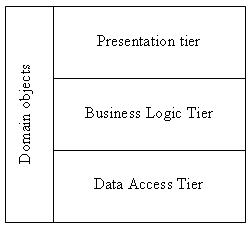
In this video tutorial I walk through the fundamentals of creating an N-Layer ASP.NET application. What is "N-Layer" you ask? N-Layer can be interpreted many different ways, but I generally use the term to mean separating presentation, business and data code into individual code layers. Doing this allows code to be re-used throughout an application and prevents unnecessary clutter in ASP.NET code-behind classes. This video covers creating presentation, business and data layers and also covers another layer I normally add to projects that I refer to as "Model". The model layer contains data entity classes that are used to pass data between the different layers. Other types of architectures can certainly be applied as well.

Requirements .NET 2.0
View Video Click Here
Download Code:

Click Here


27 oct 2007

Custom Error Pages - IHttpModule

ASP.NET Resources - ASP.NET Custom Error Pages


 using System; using System.Web;  namespace AspNetResources.CustomErrors4 {   public class MyErrorModule : IHttpModule   {     public void Init (HttpApplication app)     {       app.Error += new System.EventHandler (OnError);     }      public void OnError (object obj, EventArgs args)     {       // At this point we have information about the error       HttpContext ctx =  HttpContext.Current;        Exception exception = ctx.Server.GetLastError ();        string errorInfo =              "
Offending URL: " + ctx.Request.Url.ToString () + "
Source: " + exception.Source + "
Message: " + exception.Message + "
Stack trace: " + exception.StackTrace; ctx.Response.Write (errorInfo); // -------------------------------------------------- // To let the page finish running we clear the error // -------------------------------------------------- ctx.Server.ClearError (); } public void Dispose () {} } }
 

To plug our HttpModule into the pipeline we need to add a few lines to web.config:

<?xml version="1.0" encoding="utf-8" ?> <configuration>  <system.web>   <httpModules>    <add type="AspNetResources.CustomErrors4.MyErrorModule,«                                                     CustomErrors4"      name="MyErrorModule" />   </httpModules>  </system.web> </configuration> 

event + delegate Visual C# 2.0


Definir eventos en Visual C# (siempre usando delegados)

El delegado lo definimos de la siguiente forma:

  public  delegate  void MiEventoEventHandler(  string param1,  int param2);

Y el evento lo definimos del tipo del delegado:

  public event MiEventoEventHandler MiEvento; 
 
Ligar un método de evento en C#
 public static void UsarMiClase1()
{
    MiClase1 prueba = new MiClase1();
    // En C# 2.0 o superior no es necesario usar el delegado
    // para ligar el método con el evento
    prueba.MiEvento += prueba_MiEvento;

    prueba.Mostrar("el Guille", 49);
}

static private void prueba_MiEvento(string param1, int param2)
{
    Console.WriteLine(
        "Se produce el evento MiEvento con los parámetros: {0} y {1}" , param1, param2);
}
  
   http://www.elguille.info/NET/dotnet/equivalenciavbcs4.htm

unsafe keyword + Using Pointers in C#

Using Pointers in C#

Now it is time to write some program code to demonstrate the use of pointers. Consider the following code.

static void Main(string[] args)
{
    int age = 32;
    Console.WriteLine("age = {0}" , age);
}

unsafe keyword

static void Main(string[] args)
{
    unsafe
    {
        int age = 32;
        int* age_ptr;

        Console .WriteLine("age = {0}", age);

    }
}


Pointers to Structures:

unsafe static void Main(string[] args)

{

    Location loc;

    loc.X = 100;

    loc.Y = 100;


    Location* loc_ptr;

    loc_ptr = &loc;

    Console.WriteLine("X = {0}", loc_ptr->X);


    loc_ptr->X = 200;

    Console.WriteLine("X = {0}", loc_ptr->X);

}


Pointers and Classes:

For Example:


class PTest

{

     public PTest()

     {

     }

     public int age;

     public void DisplayAge()

     {

         Console.WriteLine("age = {0}", age);

    }

}

And some example code to create an instance of the class and then manipulate the public variable age using a pointer.

unsafe static void Main(string[] args)
{
    PTest p = new PTest();

    p.age = 32;
    p.DisplayAge();

    fixed (int* age = &p.age)
    {
        *age += 3;
    }

    p.DisplayAge();
}


INDEXER[] in C#


INDEXER IN C#:


In c# introduce new concept is Indexer. This is very useful for some situation. Let as discuss something about Indexer.

  • Indexer Concept is object act as an array.

  • Indexer an object to be indexed in the same way as an array.

  • Indexer modifier can be private, public, protected or internal.

  • The return type can be any valid C# types.

  • Indexers in C# must have at least one parameter. Else the compiler will generate a compilation error.

this [Parameter]

{

    get

    {

        // Get codes goes here

    }

    set

    {

        // Set codes goes here

    }

}  


For Example:


using System;

using System.Collections.Generic ;

using System.Text ;


namespace Indexers

{

    class ParentClass

    {

        private string[] range = new string[5];

        public string this[ int indexrange]

        {

            get

            {

                return range[indexrange];

            }

            set

            {

                range[indexrange] = value;

            }

        }

    }


    /* The Above Class just act as array declaration using this pointer */


    class childclass

    {

        public static void Main()

        {

            ParentClass obj = new ParentClass();


            /* The Above Class ParentClass   create one object name is obj */


            obj[0] = "ONE";

            obj[1] = "TWO";

            obj[2] = "THREE";

            obj[3] = "FOUR ";

            obj[4] = "FIVE";

            Console.WriteLine( "WELCOME TO C# CORNER HOME PAGE\n");

            Console.WriteLine( "\n");


            Console.WriteLine( "{0}\n,{1}\n,{2}\n,{3}\n,{4}\n", obj[0], obj[1], obj[2], obj[3], obj[4]);

            Console.WriteLine( "\n");

            Console.WriteLine( "ALS.Senthur Ganesh Ram Kumar\n");

            Console.WriteLine( "\n");

             Console.ReadLine();

        }

    }

}


http://www.c-sharpcorner.com/UploadFile/senthurganesh/109172007050741AM/1.aspx


FeedCount

analytics

 
sfrede